01
Pin it your way
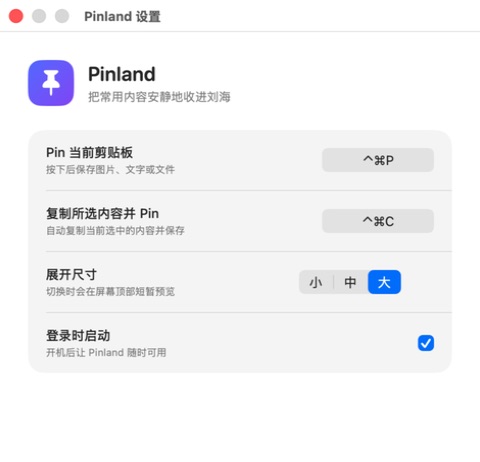
Press Control–Command–P for the clipboard, use Control–Command–C for selected content, or drag text, images, and files straight to the notch.
A quiet shelf for macOS
Pinland keeps text, images, and files inside your Mac notch—hidden until the moment you need them.

Present only when useful
A screenshot or note can stay close for hours without covering your work. Move to the notch when you want it back; Pinland opens into a calm, searchable shelf.


Press Control–Command–P for the clipboard, use Control–Command–C for selected content, or drag text, images, and files straight to the notch.
The shelf folds back into the notch. Your references stay ready without floating above every window.
Open the shelf, search by keyword, and click any Pin to copy it back. Delete one item or clear the whole shelf whenever you choose.
Small interactions, less interruption

Hover for a quick look, click to work with the full shelf, or keep it open only when the task calls for it.
A compact search control appears only when asked for, then filters your Pins by keyword.
No account, no cloud sync, no analytics, and no upload. Your Pins remain on your Mac until you remove them.
Private by construction
Pinland does not collect, share, sell, analyze, or upload your Pins. Clipboard and selected-file access happens only when you explicitly invoke a shortcut or drag something in.
Read the privacy policyHold it · Hide it · Find it
Pinland is being prepared for the Mac App Store. No account. No tracking. Just a quieter place for the things you need next.